

Your favourite foxperson is back at it again. So I've finally found a way to fix the connections to the servers from Russia without having to use a VPN and whatnot. Coincidentally, this also seemingly fixes almost everything else? At least until the government breaks something again.
This thread is aimed more at Russian users, who as I assume are familiar with DPI bypassing at this point in time. Most likely you already have Zapret installed. A universal strat has been found that seems to bypass everything as of 27th October 2025: https://github.com/Flowseal/zapret-discord-youtube/issues/5704
A short guide on what I used from that thread that helped:
0. Make sure you're using Flowseal's implementation of Zapret (the one the linked thread is from) updated to the latest version (1.8.5, at the time of writing).
1. Update
2. Copy ALT6 + Global Fix strat from the bottom of the post and add the .bat file with the rest. Name it whatever. Code to copy for easier access:
3. Download
4. Use
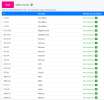
5. Launch the new strategy. Test connectivity using this website tool. If you did everything right - on most providers you should see a fully green column. The connections that matter for playing on VaultF4 are OVH and Cloudflare. Ideal case scenario: see attached image.
KNOWN ISSUES:
- Uncached player profile pictures may look like the default grey question mark ones that Steam uses
- Widewine DRM (at least Apple Music Web) content seemingly takes an awfully long time to load? Took me about a minute to start playback. Might not be related, but it's likely that it is.
- If you're scrobbling to LastFM via foobar2000's foo_scrobble plugin - connections may timeout (don't worry, it caches scrobbles until it can send them). Not sure why. Yes, this is important to mention for me.
- Ping sometimes fluctuates ±10ms, this is normal given you're basically rewriting every non-local network request your computer makes
- If something else doesn't work - check the GitHub thread linked at the beginning, as this might be slightly outdated
This thread is aimed more at Russian users, who as I assume are familiar with DPI bypassing at this point in time. Most likely you already have Zapret installed. A universal strat has been found that seems to bypass everything as of 27th October 2025: https://github.com/Flowseal/zapret-discord-youtube/issues/5704
A short guide on what I used from that thread that helped:
0. Make sure you're using Flowseal's implementation of Zapret (the one the linked thread is from) updated to the latest version (1.8.5, at the time of writing).
1. Update
list-general.txt and ipset-all.txt (in lists/ folder) to the ones found in the thread. List of domains for general can be taken from there (or below), list of ipset ranges is here. Just append both to the existing files.
Code:
1.1.1.1
1.0.0.1
embed.cloudflarestream.com
cloudflare-dns.com
one.one.one.one
help.every1dns.net
cloudflare-esni.com
cloudflare-gateway.com
cloudflare-quic.com
cloudflare.com
cloudflare.net
cloudflare.tv
cloudflareaccess.com
cloudflareapps.com
cloudflarebolt.com
cloudflareclient.com
cloudflareinsights.com
cloudflareok.com
cloudflarepartners.com
cloudflareportal.com
cloudflarepreview.com
cloudflareresolve.com
cloudflaressl.com
cloudflarestatus.com
cloudflarestorage.com
cloudflarestream.com
cloudflaretest.com
cloudflarewarp.com
cloudflare-ech.com
encryptedsni.com
2. Copy ALT6 + Global Fix strat from the bottom of the post and add the .bat file with the rest. Name it whatever. Code to copy for easier access:
Code:
@echo off
chcp 65001 > nul
:: 65001 - UTF-8

cd /d "%~dp0"
call service.bat status_zapret
call service.bat check_updates
call service.bat load_game_filter
echo:

set "BIN=%~dp0bin\"
set "LISTS=%~dp0lists\"
cd /d %BIN%

start "zapret: %~n0" /min "%BIN%winws.exe" --wf-tcp=80,443,2053,2083,2087,2096,8443,%GameFilter% --wf-udp=443,19294-19344,50000-50100,%GameFilter% ^
--filter-udp=19294-19344,50000-50100 --filter-l7=discord,stun --dpi-desync=fake --dpi-desync-repeats=6 --new ^
--filter-tcp=80 --dpi-desync=fake,multisplit --dpi-desync-autottl=2 --dpi-desync-fooling=md5sig --new ^
--filter-tcp=2053,2083,2087,2096,8443 --hostlist-domains=discord.media --dpi-desync=multisplit --dpi-desync-split-seqovl=681 --dpi-desync-split-pos=1 --dpi-desync-split-seqovl-pattern="%BIN%4pda.bin" --new ^
--filter-tcp=443 --dpi-desync=multisplit --dpi-desync-split-seqovl=681 --dpi-desync-split-pos=1 --dpi-desync-split-seqovl-pattern="%BIN%4pda.bin" --new ^
--filter-udp=443 --dpi-desync=fake --dpi-desync-repeats=6 --dpi-desync-fake-quic="%BIN%quic_initial_www_google_com.bin" --new ^
--filter-tcp=%GameFilter% --dpi-desync=multisplit --dpi-desync-split-seqovl=681 --dpi-desync-split-pos=1 --dpi-desync-split-seqovl-pattern="%BIN%4pda.bin" --new ^
--filter-udp=%GameFilter% --dpi-desync=fake --dpi-desync-autottl=2 --dpi-desync-repeats=12 --dpi-desync-any-protocol=1 --dpi-desync-fake-unknown-udp="%BIN%quic_initial_www_google_com.bin" --dpi-desync-cutoff=n2
3. Download
4pda.bin file from here and put it in the bin/ folder. This file contains the binary signature that basically makes the DPI systems partially think you're connecting to the 4PDA forum instead of whatever you desire.4. Use
service.bat to turn on Game Filter and ipset bypass - this is important as it will fail in-game connections without it. (Funny enough, the strategy doesn't use ipset bypassing but somehow it didn't work until I enabled it, at which point everything worked)5. Launch the new strategy. Test connectivity using this website tool. If you did everything right - on most providers you should see a fully green column. The connections that matter for playing on VaultF4 are OVH and Cloudflare. Ideal case scenario: see attached image.
KNOWN ISSUES:
- Uncached player profile pictures may look like the default grey question mark ones that Steam uses
- Widewine DRM (at least Apple Music Web) content seemingly takes an awfully long time to load? Took me about a minute to start playback. Might not be related, but it's likely that it is.
- If you're scrobbling to LastFM via foobar2000's foo_scrobble plugin - connections may timeout (don't worry, it caches scrobbles until it can send them). Not sure why. Yes, this is important to mention for me.
- Ping sometimes fluctuates ±10ms, this is normal given you're basically rewriting every non-local network request your computer makes
- If something else doesn't work - check the GitHub thread linked at the beginning, as this might be slightly outdated
Attachments
Last edited:

